The Scroll Bar Problem
In the ongoing debate about scroll markers and scroll buttons there is one open question.
published
Should we treat linear scroll bars and segmented scroll bars differently?
In essence, these are the questions that the whole debate hinged upon. While it is a natural occurrence for most people in the discussion, it is understandable that an overflow caused by layout and device size would result in one or two scrollbars appearing. Most also agree that there is a legitimate need for scrollbars styling in CSS.
Opinions differ in situations where the scroll scroll snap type to mandatory or proximity. This suddenly segments the scroll behaviour, allowing the user to move from item to item. The proposal for scroll marker group and scroll button provides designers with the tools to seamlessly integrate this behaviour into their website experience.
The discussion has been muddied by concerns that pseudo-elements should not be interactive. The idea is that this would impact the separation of concerns with regard to [scroll buttons]. However, neither scroll buttons nor scroll thumbs or markers are new. Browsers and operating systems generate them automatically as soon as they are needed.
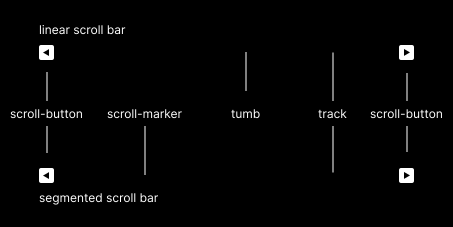
| linear scroll item | segmented scroll item | role |
|---|---|---|
| scroll thumb | scroll marker | jump to a point in the overflow |
| scroll track | scroll marker group | container for the scroll controls |
| scroll button | scroll button | jump to the next and previous page/item of the overflow |
However, many opinionated browser vendors, as well as the current state of CSS standards, have completely ditched control over scroll tracks. Whether or not scroll buttons exist is entirely up to the OS, some obscure setting and the browser itself.
Personally, I am not happy that the web standard has become insufficient for the needs of this complex UI element by reducing the styling to scrollbar-width, scrollbar-gutter and [scrollbar-color] (which is basically only a scroll thumb color).
The proposals for 'scroll marker', 'scroll marker group' and 'scroll button' give designers much more fine-tuned control. They are much more in line with the behaviour of the dismissed webkit scrollbar. A combination of the two proposals would be very helpful. Especially by reuniting the needs of segmented and lier overflows and giving designers much needed control over the look, feel and behavour of scroll elements in the user interface.